What Are the Most Secure Password Practices?
Learn the most secure password practices to protect your accounts and data. This guide covers creating strong passwords, using passphrases, password managers, multi-factor authentication, enterprise policies, recovery planning, and future trends in authentication.
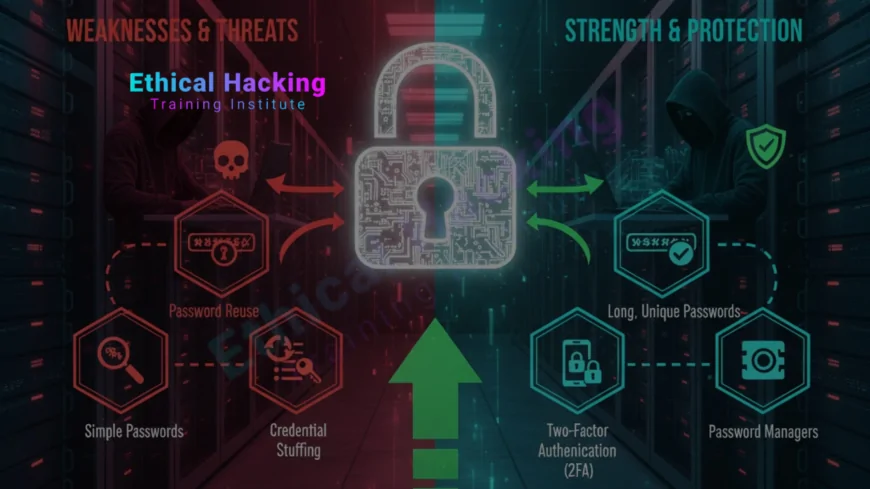
Introduction
Passwords remain the most common way people protect online accounts, yet weak password habits continue to cause breaches and account takeovers. A secure password strategy reduces the chances of unauthorized access, protects personal and corporate data, and makes other security controls like multi-factor authentication more effective. This article provides clear, practical guidance you can apply immediately, whether you are protecting personal accounts or designing password policies for an organization.
Why Password Security Matters
Compromised credentials are still one of the easiest ways attackers gain access to systems. Automated attacks such as credential stuffing use leaked username and password pairs from one breach to attempt logins across many services. Phishing, reuse of weak passwords, and predictable password-reset flows also make accounts vulnerable. Strong password practices are a low-cost, high-impact control against these threats because they raise the bar for attackers and shrink the window of opportunity for automated abuse.
Beginner or expert, knowing and applying secure password practices is essential to reduce your personal risk and to strengthen an organization's overall security posture. Tools and training help, but the basics of strong password creation are the foundation. Security professionals often pair password best practices with broader learning about attacker tools such as Nmap to understand what an attacker can see and how exposed services amplify credential risk.
Common Password Mistakes
Recognizing common mistakes helps you remove risky habits quickly. Typical errors include:
- Reusing the same password across multiple accounts.
- Choosing short, dictionary-based, or easily guessable passwords like "password123" or "qwerty".
- Using obvious personal information such as names, birthdates, or pet names.
- Relying solely on browser autofill without a dedicated password manager.
- Following overly rigid rotation policies that encourage minor predictable changes, for example incrementing a final digit when forced to rotate frequently.
These mistakes dramatically increase the odds of compromise because attackers can automate guessing and reuse leaked credentials across many services. Removing these habits is one of the fastest ways to improve security.
Characteristics of Strong Passwords and Passphrases
Modern guidance favors length and unpredictability over forced complexity alone. A strong password or passphrase typically follows these rules:
- Use a long passphrase: prefer 12 characters or more, and 16+ for critical accounts.
- Make it unpredictable: combine unrelated words and include spaces or separators to form a memorable phrase.
- Avoid common substitutions and dictionary words that are easy to brute force with modern hardware.
- Prefer passphrases over short complex passwords, because humans can remember a sentence-like phrase more easily than random characters.
- Use unique passwords per account to prevent credential reuse attacks.
Example of a better passphrase: "coffee sail-orange 1987?window" is far stronger than "Password!23" despite the latter having mixed character types. The key is combining length with unpredictability to increase the time and cost for an attacker to crack the secret.
As attackers become more automated and AI assisted at triaging leaked credentials, defenders should emphasize passphrases and uniqueness along with broader defensive learning such as techniques discussed around AI assisted threat detection.
Password Managers: Why and How to Use Them
Password managers solve the biggest problem in password security: remembering unique, long, random credentials. A password manager stores encrypted entries and can generate strong random passwords for each account. It reduces reuse and makes it feasible to follow best practices without memorizing dozens of passwords.
- Choose a reputable password manager with strong encryption and a clear security model.
- Use the built-in password generator to create long randomized passwords for each site.
- Protect your manager with a strong, unique master passphrase and enable multi-factor authentication for the manager itself.
- Back up the encrypted vault according to vendor recommendations so you do not lose access.
When used correctly, a password manager removes the temptation to reuse passwords and makes account recovery and rotation straightforward.
Multi-Factor Authentication and Alternatives
Multi-factor authentication, commonly abbreviated MFA, adds a second verification factor beyond the password and is one of the most effective defenses against account takeover. Common second factors include time-based one time passwords (TOTP), hardware security keys (FIDO U2F), SMS codes, and push notifications. Each has trade-offs:
- Hardware security keys: Provide strong phishing-resistant authentication and are recommended for high-value accounts.
- TOTP apps: Offer good security and are widely supported; use an authenticator app rather than SMS where possible.
- SMS: Better than no MFA, but vulnerable to SIM swapping and interception.
- Push notifications: Convenient, but ensure you have robust device security to prevent silent approvals.
Combine unique passwords with MFA to significantly reduce risk. For teams and learners, structured courses and labs often demonstrate MFA setup and bypass resistance in a controlled setting; consider including such training in your learning path and policies, for example through an organized course that covers authentication and practical defensive measures.
Enterprise Password Policies and Enforcement
At scale, organizations enforce password policies to ensure a baseline of security. Effective enterprise policies follow these principles:
- Require strong, unique passwords or passphrases and discourage simple rotation rules that create predictability.
- Enforce minimum lengths and check passwords against breach collections and common password lists using a "deny if breached" approach.
- Mandate multi-factor authentication for privileged accounts and access to sensitive systems.
- Provide and require a centrally approved password manager for employees to reduce reuse.
- Apply progressive throttling and lockouts for repeated failed attempts, and supplement with risk-based authentication for unusual logins.
Policy alone is not enough; enforcement, user training, and usability considerations determine success. To build a capable security team that designs and enforces such policies, many professionals pursue industry-recognized training and certifications like CEH to learn both offensive and defensive techniques.
Password Recovery and Incident Response
Secure password recovery processes are critical because weak recovery flows are an attack vector. Best practices include:
- Avoid insecure recovery questions that can be guessed or researched.
- Use email and MFA-based recovery flows and log recovery attempts for later review.
- Implement rate limiting on recovery attempts and alert users to suspicious requests.
- Require re-authentication for high privilege actions, rather than relying solely on a password reset token.
- Maintain incident response playbooks that include credential compromise scenarios, forced password resets, and monitoring for suspicious post-reset activity.
When a compromise is suspected, quickly revoke sessions, rotate credentials, and require MFA re-enrollment where applicable. Effective incident response minimizes damage and restores trust.
Organizations and individuals building a foundational cybersecurity plan may also find value in local and online training to ensure recovery and response practices are practiced and understood.
Password Storage, Hashing, and Server-Side Best Practices
How a service stores and verifies passwords matters as much as what users pick. Server-side best practices include:
- Never store plaintext passwords. Always store password hashes using modern, slow hashing algorithms like bcrypt, Argon2, or scrypt.
- Apply a cryptographic salt for each password so identical passwords across users produce different hashes.
- Use appropriate work factors so hashing is computationally expensive for attackers but acceptable for your authentication system.
- Monitor for large-scale failed login attempts and credential stuffing behavior at the service level.
- Offer and encourage MFA to reduce risk even if password hashes are compromised.
Services that adopt these patterns make breaches less useful to attackers and buy time to detect and respond if a leak occurs.
Future Trends: Passwordless and Beyond
Authentication is evolving. Passwordless approaches such as passkeys, WebAuthn, and device-based cryptographic authentication reduce reliance on shared secrets and resist many phishing and replay attacks. While passwordless adoption is growing, it is not yet universal. For now, combining strong unique passwords, password managers, and MFA provides a pragmatic defense. Organizations should pilot passwordless for high-value services while maintaining well designed password options for legacy systems.
Continuous learning about authentication trends and hands-on practice with modern mechanisms will help you stay ahead as the landscape shifts. For structured learning and career-ready skills that include modern authentication techniques, many professionals explore advanced training and certification options to formalize their knowledge.
If you want to formalize a training plan or enroll teams in guided coursework that covers both legacy password practices and modern authentication options, consider reputable training paths that include hands on labs and assessments, such as a focused training program.
Security Checklist: Quick Reference for Secure Password Practices
| Area | Best Practice | Why it matters |
|---|---|---|
| Password Creation | Use long passphrases, unique per account, 12+ chars | Increases time and cost for attackers to crack passwords |
| Password Storage | Hash with Argon2/bcrypt, use per-user salts | Reduces usefulness of leaked credential databases |
| Authentication | Require MFA, prefer hardware keys where possible | Prevents account takeover even if password is stolen |
| Recovery | Secure recovery with MFA and logging, avoid weak security Qs | Prevents attackers from hijacking accounts via recovery flows |
| Operational | Use password managers, enforce deny-if-breached checks | Reduces reuse and improves response to credential leaks |
Frequently Asked Questions
What length should a secure password or passphrase be?
For most accounts, aim for at least 12 characters. For high value services, prefer 16 characters or more. Length combined with unpredictability is stronger than short complex passwords.
Should I use a password manager?
Yes. Password managers enable unique, long passwords for each account and make it easy to store and retrieve credentials securely while reducing reuse.
Is multi-factor authentication always necessary?
MFA is strongly recommended, especially for email, financial accounts, and administrative services. It significantly reduces risk of account takeover.
Are passphrases better than complex passwords?
Often yes. Passphrases that are long and unpredictable provide better protection and are easier for humans to remember than short strings of complex characters.
How often should I change my passwords?
Change passwords when you suspect compromise or when notified of a breach. Forced frequent rotation without cause can lead to weaker, predictable changes.
Is SMS-based MFA safe?
SMS is better than nothing but is vulnerable to SIM swap attacks. Use authenticator apps or hardware keys where possible.
Can I trust browser-saved passwords?
Browser password stores are convenient, but dedicated password managers tend to offer stronger security features and easier cross-device sync with better security controls.
What is a "breached password" check?
A breached password check compares candidate passwords against databases of leaked credentials. Denying known breached passwords prevents reuse of compromised secrets.
How should organizations enforce password policies?
Enforce minimum lengths, deny breached passwords, require MFA for critical services, and provide an approved password manager to reduce risky behavior.
Are passkeys and passwordless logins secure?
Yes. Passkeys and WebAuthn offerings provide phishing-resistant authentication and are considered more secure than traditional password-based methods when implemented correctly.
What if I lose access to my password manager?
Follow provider recovery procedures which often involve recovery keys or secure backups. Always record and store any recovery keys in a safe offline place.
How do attackers bypass passwords?
Common techniques include credential stuffing with leaked passwords, phishing to trick users into giving credentials, brute-force attacks, and exploiting weak recovery flows.
Should I include special characters and numbers?
These help but are not a substitute for length and uniqueness. A long passphrase with some variety is better than a short complex password.
Is biometric authentication a suitable alternative?
Biometrics add convenience and can be part of multifactor setups, but they have privacy and revocation challenges. Combine biometrics with other factors when possible.
Where can I learn more about secure authentication?
Consider structured courses and reputable resources that include hands-on labs and modern authentication topics; guided training helps teams adopt best practices and respond to evolving threats.
What's Your Reaction?
 Like
0
Like
0
 Dislike
0
Dislike
0
 Love
0
Love
0
 Funny
0
Funny
0
 Angry
0
Angry
0
 Sad
0
Sad
0
 Wow
0
Wow
0