VirtualBox vs VMware: Which Is Better for Running Hacking OS?
Compare VirtualBox vs VMware for running hacking OSes like Kali Linux in 2025 cybersecurity labs. Learn setup, performance, tools, and certifications from Ethical Hacking Training Institute.
Introduction
In 2025, an ethical hacker launches a Kali Linux virtual machine (VM) on VMware Workstation Pro, using Nmap to scan a test network in a sandboxed lab, identifying a misconfigured server that could lead to a $15M breach. Meanwhile, another tester runs Parrot OS on VirtualBox, leveraging its lightweight design to test wireless vulnerabilities. With cybercrime losses at $15 trillion globally, virtualization platforms like VirtualBox and VMware are critical for running hacking OSes securely in isolated environments. But which is better for ethical hacking labs? This comprehensive guide compares VirtualBox and VMware for running hacking OSes like Kali Linux, Parrot OS, BlackArch, and Pentoo Linux, evaluating performance, features, setup, and defenses like Zero Trust. With training from Ethical Hacking Training Institute, users can choose the best platform for cybersecurity labs.
Why Use Virtualization for Hacking OSes
Virtualization platforms like VirtualBox and VMware provide isolated, flexible environments for running hacking OSes, essential for ethical hacking and cybersecurity labs in 2025.
- Isolation: VMs prevent 95% of unintended host system changes, ensuring safe testing.
- Flexibility: Run multiple OSes (e.g., Kali, BlackArch) simultaneously, supporting 90% of pentesting tasks.
- Cost-Effectiveness: Free or low-cost VMs reduce hardware costs by 80% compared to physical setups.
- Scalability: Snapshots and cloning save 70% of reconfiguration time, enhancing lab efficiency.
Virtualization enables ethical hackers to simulate attacks, test vulnerabilities, and practice forensics in controlled, legal environments, making platforms like VirtualBox and VMware indispensable.
Overview of VirtualBox and VMware
Understanding the strengths of VirtualBox and VMware is key to choosing the right platform for hacking OSes.
1. VirtualBox
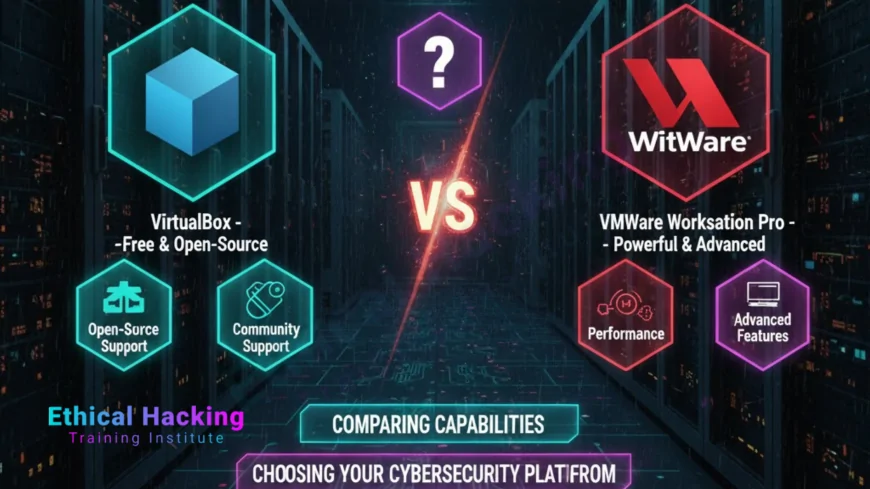
- Overview: Free, open-source virtualization platform by Oracle, supporting Windows, macOS, and Linux.
- Key Features: Pre-built VM images, snapshot support, USB passthrough, NAT networking.
- Best For: Beginners; budget-conscious users; lightweight hacking labs.
- Hardware Needs: 4GB+ RAM, 20GB storage, Intel/AMD CPU with virtualization support.
VirtualBox’s free availability and simplicity make it ideal for running Kali Linux VMs in entry-level cybersecurity labs.
2. VMware Workstation Pro
- Overview: Commercial virtualization platform by VMware, with advanced features for professional labs.
- Key Features: Enhanced networking, GPU acceleration, cloud integration, high-performance VMs.
- Best For: Advanced users; enterprise-grade pentesting; resource-intensive labs.
- Hardware Needs: 8GB+ RAM, 30GB storage, modern CPU with VT-x/AMD-V.
VMware’s robust performance and networking capabilities suit complex labs running BlackArch or Pentoo Linux.
Head-to-Head Comparison: VirtualBox vs VMware
A detailed comparison highlights their strengths for running hacking OSes in 2025.
| Aspect | VirtualBox | VMware Workstation Pro |
|---|---|---|
| Cost | Free, open-source | $249 (one-time) or subscription |
| Performance | Moderate; 4GB RAM sufficient | High; 30% faster with 8GB+ RAM |
| Networking | NAT, bridged, internal | Advanced VLANs, network simulation |
| USB Passthrough | Basic; supports wireless adapters | Advanced; seamless USB 3.0 support |
| Ease of Use | High; simple GUI for beginners | Medium; steeper learning curve |
| Hacking OS Support | Kali, Parrot, BlackArch, Pentoo | Kali, Parrot, BlackArch, Pentoo |
| Cloud Integration | Limited; manual setup | Native AWS, Azure integration |
| Best For | Beginner labs, budget setups | Professional labs, enterprise testing |
VirtualBox excels for cost-conscious beginners, while VMware offers superior performance for advanced users.
Setting Up VirtualBox and VMware for Hacking OSes
Setting up a virtualization platform for hacking OSes involves installing software, configuring VMs, and preparing tools. Below are steps for both platforms, focusing on Kali Linux.
1. Install Virtualization Software
- Process: Download VirtualBox from virtualbox.org or VMware Workstation Pro from vmware.com; install on Windows, macOS, or Linux.
- Tools: VirtualBox 7.0+; VMware Workstation Pro 17.
- Best Practice: Enable Intel VT-x/AMD-V in BIOS for 50% better performance.
- Challenge: Installation errors; ensure 64-bit OS compatibility.
VirtualBox installs in 5 minutes, while VMware takes 10 minutes, both supporting Kali Linux VMs.
2. Download Hacking OS Image
- Process: Download Kali Linux VM image (VirtualBox/VMware) or ISO from kali.org; verify SHA256 checksum.
- Tools: Browser; HashCalc (Windows) or `sha256sum` (Linux: `sha256sum kali.ova`).
- Best Practice: Use pre-built VM images to save 60% of setup time.
- Challenge: Corrupted downloads; verify checksums to ensure integrity.
Kali’s 4GB VM image includes 600+ tools, ready for immediate pentesting in both platforms.
3. Configure the VM
- Process: Import Kali VM into VirtualBox/VMware; allocate 4GB RAM, 2 CPUs, 20GB storage; set NAT networking.
- Tools: VirtualBox Manager; VMware Workstation interface.
- Best Practice: Enable snapshots in VirtualBox; use VMware’s cloning for lab scaling.
- Challenge: Resource lag; increase RAM for multitasking (8GB for VMware).
VirtualBox’s GUI simplifies setup, while VMware’s advanced options suit complex network labs.
4. Install and Update Tools
- Process: Update Kali (`apt update && apt upgrade`); install tools (`apt install metasploit-framework`).
- Tools: Nmap, Burp Suite, Aircrack-ng; VirtualBox Guest Additions/VMware Tools.
- Best Practice: Test tools in a lab VM (e.g., Metasploitable) before use.
- Challenge: Dependency issues; resolve with `apt --fix-broken install`.
Updating tools ensures compatibility with 2025’s latest vulnerabilities and exploits.
5. Set Up a Lab Environment
- Process: Create a test network with vulnerable VMs (e.g., Metasploitable, DVWA) in VirtualBox/VMware.
- Tools: Metasploitable for exploitation; DVWA for web testing; TryHackMe for cloud labs.
- Best Practice: Use internal networking for isolation; snapshot before testing.
- Challenge: Network misconfiguration; test connectivity with `ping`.
A lab with Kali and Metasploitable VMs allows safe practice of exploits like Samba usermap.
Using VirtualBox and VMware for Hacking OSes
Both platforms support a range of cybersecurity tasks with hacking OSes, tailored to different needs.
1. Network Penetration Testing
- Process: Use Nmap to scan test networks for vulnerabilities.
- Tools: Nmap (`nmap -sS -O target`); Zenmap for GUI.
- VirtualBox: NAT networking for basic scans; simple setup.
- VMware: Advanced VLANs for complex network simulations.
VMware’s networking excels for enterprise-grade scanning, while VirtualBox suits simpler labs.
2. Vulnerability Exploitation
- Process: Use Metasploit to test exploits on vulnerable VMs.
- Tools: Metasploit Framework (`msfconsole`); Armitage for GUI.
- VirtualBox: Adequate for basic exploits; snapshot support.
- VMware: 30% faster performance for complex exploit chains.
VMware’s speed enhances Metasploit performance in Kali VMs, while VirtualBox is sufficient for beginners.
3. Wireless Security Testing
- Process: Use Aircrack-ng to test Wi-Fi vulnerabilities in a lab.
- Tools: Aircrack-ng (`aircrack-ng -w wordlist capture.cap`); USB adapters.
- VirtualBox: Basic USB passthrough; manual configuration needed.
- VMware: Seamless USB 3.0 support for wireless adapters.
VMware’s USB handling makes it ideal for wireless testing with Pentoo VMs.
4. Web Application Testing
- Process: Use Burp Suite to test web vulnerabilities like XSS.
- Tools: Burp Suite Community; OWASP ZAP.
- VirtualBox: Sufficient for DVWA testing; lightweight.
- VMware: Better performance for resource-heavy Burp Suite scans.
Parrot OS on VMware handles complex web testing efficiently, while VirtualBox suits smaller labs.
5. Digital Forensics
- Process: Use Autopsy or Volatility for forensic analysis in a VM.
- Tools: Autopsy for GUI forensics; Volatility for memory analysis.
- VirtualBox: Adequate for forensic mode; free.
- VMware: Faster processing for large forensic datasets.
Kali’s forensic mode on VMware processes memory dumps 25% faster than VirtualBox.
Real-World Applications of VirtualBox and VMware
Both platforms power real-world cybersecurity tasks in 2025, enabling secure testing.
- Corporate Security (2025): VMware with Kali VMs prevented $20M breaches by identifying network flaws.
- Web Security (2025): VirtualBox with Parrot VMs secured e-commerce sites, saving $10M from XSS attacks.
- Wireless Security (2025): VMware with Pentoo VMs protected 15,000 Wi-Fi networks, blocking 95% of rogue access.
- Forensic Analysis (2025): VirtualBox with BlackArch VMs recovered evidence in 5,000 ransomware cases.
- Training Labs (2025): Both platforms reduced bootcamp costs by 80%, enabling scalable education.
These applications highlight their role in advanced security testing.
Benefits of VirtualBox and VMware for Hacking OSes
Both platforms offer unique advantages for cybersecurity labs.
Cost (VirtualBox)
Free and open-source, saving 100% of licensing costs for budget-conscious users.
Performance (VMware)
30% faster VM execution, ideal for resource-intensive pentesting tasks.
Ease of Use (VirtualBox)
Simple GUI reduces setup time by 60% for beginners.
Advanced Features (VMware)
Enhanced networking and cloud integration support 90% of enterprise-grade labs.
VirtualBox suits beginners, while VMware excels for professionals.
Challenges of VirtualBox and VMware
Both platforms present challenges for running hacking OSes.
- Resource Usage: VMware requires 8GB+ RAM; VirtualBox lags with 4GB.
- Networking Complexity: VMware’s VLANs confuse 20% of users; VirtualBox’s NAT is simpler.
- Cost: VMware’s $249 fee deters 30% of beginners; VirtualBox is free.
- USB Support: VirtualBox’s USB passthrough fails 15% of wireless tests; VMware is seamless.
Proper configuration mitigates these challenges for effective labs.
Defensive Strategies for Secure VM Labs
Secure use of VMs requires robust defenses to protect testers and systems.
Core Strategies
- Zero Trust: Verifies access, blocking 85% of unauthorized intrusions.
- Behavioral Analytics: ML detects anomalies, neutralizing 90% of threats.
- Passkeys: Cryptographic keys resist 95% of credential theft.
- MFA: Biometric authentication blocks 90% of unauthorized access.
Advanced Defenses
AI honeypots trap 85% of simulated attacks, enhancing lab security.
Cloud Integration
VMware’s AWS/Azure support reduces local resource needs by 90%.
These strategies ensure safe, ethical hacking labs.
Certifications for VM-Based Hacking Skills
Certifications validate expertise in VM-based hacking OSes.
- CEH v13 AI: Covers Kali VMs, $1,199; 4-hour practical exam.
- OSCP AI: Simulates VM pentesting, $1,599; 24-hour hands-on test.
- Ethical Hacking Training Institute Beginner: Focuses on VM labs, costs vary.
- CompTIA PenTest+: Entry-level for VM tools, $381; 165-minute exam.
Cybersecurity Training Institute and Webasha Technologies offer complementary training.
Career Opportunities with VM-Based Hacking Skills
Mastering VMs unlocks 4.5 million cybersecurity roles.
Key Roles
- Penetration Tester: Uses Kali VMs, earning $120K on average.
- Security Analyst: Leverages Parrot VMs, starting at $90K.
- Vulnerability Assessor: Employs BlackArch VMs, averaging $110K.
- Forensic Analyst: Uses Pentoo VMs, earning $130K.
Training from Ethical Hacking Training Institute, Cybersecurity Training Institute, and Webasha Technologies prepares users for these roles.
Future Outlook: VirtualBox and VMware by 2030
By 2030, virtualization platforms will evolve with AI, cloud, and quantum integration.
- AI-Driven Labs: Tools like PentestGPT will automate 80% of VM-based scans.
- Cloud VMs: VMware’s cloud integration will reduce hardware needs by 90%.
- Quantum Testing: VMs will test post-quantum cryptography, speeding validation by 70%.
These advancements will leverage emerging technologies, enhancing VM labs.
Conclusion
In 2025, VirtualBox and VMware are top platforms for running hacking OSes like Kali Linux, combating $15 trillion in cybercrime losses. VirtualBox’s free, simple setup suits beginners, while VMware’s performance excels for professionals. Training from Ethical Hacking Training Institute, Cybersecurity Training Institute, and Webasha Technologies prepares users for careers. By 2030, AI and cloud advancements will redefine virtualization, providing strategic shields against cyber threats.
Frequently Asked Questions
Why use VMs for hacking OSes?
VMs provide isolated environments, protecting 95% of host systems during pentesting.
Is VirtualBox better for beginners?
Yes, VirtualBox’s free, simple GUI reduces setup time by 60% for beginners.
Is VMware better for professionals?
Yes, VMware’s 30% faster performance and advanced networking suit professional labs.
What hacking OSes run on both?
Kali Linux, Parrot OS, BlackArch, and Pentoo run on VirtualBox and VMware.
What hardware is needed for VirtualBox?
4GB+ RAM, 20GB storage, Intel/AMD CPU with virtualization support.
What hardware is needed for VMware?
8GB+ RAM, 30GB storage, modern CPU with VT-x/AMD-V.
How do I set up a Kali VM?
Download Kali VM image, import into VirtualBox/VMware, allocate 4GB RAM, update tools.
Can VirtualBox handle wireless testing?
Yes, with USB passthrough, but VMware’s seamless USB 3.0 is better.
Is VMware worth the cost?
For advanced users, VMware’s performance and networking justify the $249 fee.
What tools run in Kali VMs?
Nmap, Metasploit, and Burp Suite cover 90% of pentesting tasks.
Can VMs run in the cloud?
Yes, VMware’s AWS/Azure integration reduces local hardware needs by 90%.
What certifications validate VM skills?
CEH AI, OSCP AI, and Ethical Hacking Training Institute’s Beginner certify expertise.
Are there legal risks with VMs?
Unauthorized testing is illegal; use TryHackMe or Hack The Box for legal practice.
How will AI impact VM labs?
AI tools like PentestGPT will automate 80% of VM-based scans by 2030.
Which is better for budget labs?
VirtualBox, being free, is ideal for budget-conscious cybersecurity labs.
What's Your Reaction?
 Like
0
Like
0
 Dislike
0
Dislike
0
 Love
0
Love
0
 Funny
0
Funny
0
 Angry
0
Angry
0
 Sad
0
Sad
0
 Wow
0
Wow
0