





How to Set Up a Virtual Ethical Hacking Lab at Home?
Build a safe, private virtual ethical hacking lab at home to practise penetration testing, web application security, network analysis, and exploit development. This guide covers hardware and software requirements, virtualization choices, vulnerable targets, network configuration, isolation, useful tools, lab exercises, legal and safety rules, and how to scale your lab for certifications and real-world practice.
Introduction
Creating a virtual ethical hacking lab at home is one of the best investments for anyone learning cybersecurity. A lab provides a legal, repeatable environment where you can practice scanning, exploitation, post-exploitation techniques, and defensive monitoring without risking harm to production systems. This guide walks you from planning and hardware choices through building isolated networks, choosing vulnerable targets, installing tools, running exercises, and following safety and legal practices.
Why a Home Virtual Lab Matters
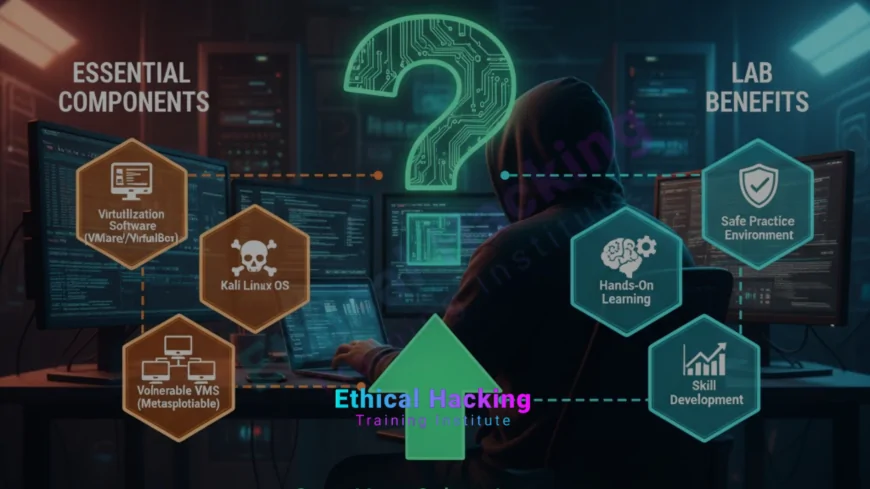
A home lab lets you make mistakes safely and learn the full lifecycle of security testing, from reconnaissance to reporting. It gives practical context that theoretical courses lack, and it is essential for preparing for hands-on certifications like OSCP or CEH Practical. Labs also let you reproduce public vulnerabilities, test patches, and build a portfolio of writeups that employers value.
Hardware and Host Requirements
Your host machine is the backbone of the lab. While you can begin with modest hardware, a comfortable lab experience needs decent CPU, RAM, and storage. Here are recommended minimums and ideal specs:
- Minimum: Quad-core CPU, 16 GB RAM, 256 GB SSD. Good for 2–3 concurrent VMs for basic practice.
- Recommended: 6–8 core CPU, 32 GB+ RAM, 1 TB SSD or NVMe, SSD for VM storage. Allows multiple VMs, a Kali attacker VM, several targets, and a logging/monitoring VM.
- Optional: A separate secondary machine or small server (Intel NUC or repurposed desktop) for running additional targets, or a home lab rack if you scale up.
Use SSDs for fast snapshots and restores. If you use cloud-based lab instances instead of local VMs, ensure you understand cloud costs and isolation controls.
Choosing Virtualization Software
Virtualization software runs your virtual machines. Popular choices are VirtualBox and VMware Workstation/Player for local setups, and Proxmox or VMware ESXi for advanced homelab servers. Each has pros and cons:
- VirtualBox: Free, cross-platform, great for beginners and small labs.
- VMware Workstation/Player: More polished, better performance in some cases; Workstation Pro is paid.
- Proxmox or ESXi: For dedicated homelab servers, supports clustering, storage pools and better resource management.
For most learners, VirtualBox or VMware Workstation on a strong laptop or desktop is the fastest way to get started.
Network Topology and Isolation
Isolation is critical. Never connect vulnerable targets directly to your production home network. Use virtual network types to isolate traffic and prevent accidental spreading.
- Host-only networks: Allow traffic only between VMs and the host, preventing internet access unless specifically allowed.
- NAT networks: Provide internet access to VMs while hiding them behind the host’s network address translation.
- Internal networks (VM-only): Create segmented networks that simulate internal enterprise segments without host or internet access.
A good starting topology: one attacker VM on a host-only network plus one or more target VMs on the same host-only network so the attacker can reach targets. Use a separate NAT or bridged interface for lab internet access if you need updates, but limit this carefully and monitor egress.
Selecting Operating Systems and Vulnerable Targets
Choose a mix of attacker, target, and utility machines. Typical lab catalog:
- Attacker machine: Kali Linux or Parrot OS — preloaded with security tools (Nmap, Metasploit, Burp, Wireshark).
- Vulnerable targets: Metasploitable, OWASP Juice Shop, DVWA, WebGoat, Damn Vulnerable Linux, VulnHub or intentionally vulnerable containers.
- Windows targets: Windows 10/2016/2019 images with deliberate misconfigurations for post-exploitation practice.
- Services: A small web server, an API server, a database VM, and a file server to emulate multi-tier apps.
Download trusted vulnerable images from reputable sources. Keep target systems offline from your main network and use snapshotting heavily so you can revert easily.
Essential Tools to Install
Your attacker VM should include a balanced toolset: reconnaissance, exploitation, web testing, network analysis, and reporting. Key tools:
- Nmap: Host discovery and port scanning.
- Masscan: Fast port scanning for larger ranges.
- Burp Suite: Web proxy and scanner for application testing.
- OWASP ZAP: Open-source web app scanner.
- Metasploit Framework: Exploitation and payload management.
- Wireshark: Packet capture and analysis.
- Sqlmap: Automated SQL injection detection and exploitation.
- John / Hashcat: Password auditing and cracking.
- Netcat: Network debugging and shell pivoting.
- Docker: For deploying container-based vulnerable apps quickly.
Keep tools updated, but avoid downloading cracked versions. Use official repositories and package managers.
Setting Up Logging, Monitoring, and a Centralized Workspace
Add a logging or monitoring VM to practice detection and incident response. Useful components:
- SIEM / Log collector: ELK stack (Elasticsearch, Logstash, Kibana) or a lightweight syslog server to collect logs from targets and the attacker VM.
- Network sensor: Zeek or Suricata for network traffic analysis and intrusion detection practice.
- Git / notes: A Git repository to store exploit scripts, writeups and methodology notes.
Monitoring your lab traffic helps you understand attacker techniques from the defender perspective and prepares you for blue team tasks.
Practical Lab Exercises and Learning Path
Structure your lab practice with increasing complexity. A suggested progression:
- Reconnaissance exercises: Use Nmap, Netdiscover, and enumeration tools to build asset maps.
- Web testing: Practice XSS, SQL injection, authentication flaws and CSRF on OWASP Juice Shop or DVWA.
- Exploitation: Use Metasploit and manual exploitation to gain footholds on Metasploitable boxes.
- Post-exploitation: Practice privilege escalation, persistence, credential harvesting, and lateral movement.
- Capture The Flag (CTF): Solve CTF challenges that focus on web, pwn, crypto and forensics categories.
- Detection and response: Simulate attacks and analyse logs with Zeek/Suricata and ELK, then write incident reports.
Document each exercise, include commands used, PoC screenshots, remediation steps and lessons learned. These writeups form a strong portfolio.
Snapshotting and Version Control for VMs
Use snapshots liberally. Snapshots let you return to a known-good state after a destructive test. Name snapshots clearly and maintain a simple version history for each VM. For code, scripts and notes, use Git to track changes and collaborate if you work with peers.
Safety, Legal and Ethical Considerations
Ethical practice demands legal and safety boundaries. Only test systems you own or have explicit permission to test. Never connect vulnerable VMs to public networks where they can cause harm or be used to attack others. Keep your lab offline or behind carefully-configured NAT/host-only networks.
- Obtain written permission for tests that simulate realistic attacks on third-party systems.
- Use non-production accounts and anonymised data when possible.
- Do not publish exploit details that could be used maliciously without responsible disclosure procedures.
Following these rules protects you legally and ethically while ensuring your lab remains a learning environment.
Scaling the Lab: Containers, Cloud, and Distributed Targets
As your skills grow, scale your lab with containers and cloud instances. Docker allows you to spin up vulnerable apps quickly, while cloud providers let you simulate public-facing infrastructure. When using cloud services, enforce strict egress and ingress rules, and never run attacker VMs that target other customers or the public internet.
- Docker: Fast deployment of web apps, APIs and vulnerable containers (use images from reputable CTF or training repos).
- Cloud labs: AWS, Azure or GCP can host test networks, but watch costs and abide by provider policies.
- Distributed targets: Set up multiple VMs on different internal subnets to practise pivoting and multi-hop attacks.
Preparing for Certifications with Your Lab
Many hands-on certifications require extensive lab practice. Map certification objectives to lab exercises:
- OSCP: Time-boxed exploitation, pivoting, reporting and web app exploitation practice.
- CEH Practical: Web application testing, vulnerability discovery, and reporting skills.
- Other practical certs: Build tasks in your lab that simulate exam scenarios and timed pwn exercises.
Simulate exam timelines, create concise reports, and practice under pressure to improve speed and accuracy.
Common Problems and Troubleshooting Tips
Labs can be frustrating at first. Here are quick fixes for frequent issues:
- Network unreachable: Check VM network adapters, host-only network settings, and firewall rules.
- Slow VMs: Reduce concurrent VMs, allocate more RAM/CPU, or pause unused VMs.
- Broken snapshots: Keep backups and avoid chaining too many snapshots; export VMs as backups periodically.
- Tool errors: Keep tools updated, check dependencies, and read error logs closely for missing libraries.
Table: Sample Lab Build Checklist
| Item | Recommended | Notes |
|---|---|---|
| Host machine | 8-core CPU, 32 GB RAM, SSD | Good balance for multiple VMs and snapshots |
| Virtualization | VirtualBox or VMware | Choose what you are comfortable with |
| Attacker OS | Kali Linux | Preinstalled tools and community support |
| Vulnerable targets | Metasploitable, DVWA, OWASP Juice Shop | Use trusted sources only |
| Monitoring | Zeek/Suricata + ELK | Log collection for detection practice |
| Backup & snapshots | Regular snapshots & VM exports | Essential for fast recovery |
Conclusion
Building a virtual ethical hacking lab at home is an empowering step for any aspiring cybersecurity practitioner. It gives you a safe environment to experiment, fail, learn, and document discoveries. Start small with a Kali attacker VM and one or two vulnerable targets, focus on methodical learning, and add monitoring and complexity over time. Keep your lab isolated, follow legal and ethical rules, and document everything you learn. Over months, your lab will become a powerful learning playground and a portfolio of applied skills employers will value.
Frequently Asked Questions
Do I need an expensive PC to run a home lab?
No, you can start with a modest machine (quad-core, 16 GB RAM) for a few VMs. For comfortable multi-VM work, 32 GB RAM and an SSD are recommended.
Is it legal to practise hacking at home?
Yes, as long as you only test systems you own or have explicit permission to test. Never target external systems or networks without written consent.
Should I connect my lab to the internet?
Keep your lab isolated by default. Only allow internet access for updates and avoid exposing vulnerable VMs publicly to prevent misuse.
What vulnerable targets should I use first?
Begin with Metasploitable, OWASP Juice Shop, and DVWA; these are intentionally vulnerable and great for learning web and host exploitation.
How do I practise web application testing safely?
Use local vulnerable web apps or containerised challenges and never scan or attack live sites you do not own or have permission to test.
Do I need to learn programming for a lab?
Basic scripting skills (Bash, Python) are very helpful to automate tasks and write simple exploit or parsing scripts. They speed up learning.
How often should I snapshot my VMs?
Snapshot before major changes or tests and keep a regular snapshot schedule; create exports for long-term backups periodically.
Can I use containers instead of VMs?
Yes, Docker is excellent for spinning up target apps quickly, but containers share the host kernel so maintain strict isolation and be cautious with privilege settings.
How do I document my lab work?
Write step-by-step reports, save screenshots and command history, keep PoC code in Git, and summarise remediation suggestions to build a professional portfolio.
What are common mistakes beginners make?
Common mistakes include connecting targets to the home network, skipping snapshots, using pirated tools, and testing systems without permission.
Can I prepare for certifications using my home lab?
Yes, map certification objectives to lab exercises for practical readiness; simulate timed scenarios and practise writing concise reports under pressure.
How do I monitor lab traffic for detection practice?
Deploy a sensor such as Zeek or Suricata and forward logs to an ELK or Grafana stack to visualise and hunt for anomalies created during attacks.
Should I use cloud hosts for additional targets?
Cloud can be useful for public-facing simulations, but ensure strict firewall rules and never attack third-party services or other customers; watch costs and provider policies.
How can I improve my lab over time?
Gradually add complexity: more targets, segmented networks, domain controllers, simulated enterprise services, and integrate blue team monitoring and SIEM skills.
Where can I find lab challenges and vulnerable images?
Trusted sources include VulnHub, OWASP projects, Metasploitable, and reputable CTF platforms; always verify the source and checksum before use.
What's Your Reaction?
 Like
0
Like
0
 Dislike
0
Dislike
0
 Love
0
Love
0
 Funny
0
Funny
0
 Angry
0
Angry
0
 Sad
0
Sad
0
 Wow
0
Wow
0











