How to Secure a Wi-Fi Network from Hackers?
Learn how to secure your Wi-Fi network from hackers with proven methods, including encryption, router configuration, firewall setup, and access control. This guide explains best practices, tools, and strategies to protect home and business wireless networks against cyber threats.
Introduction
A wireless connection keeps us online everywhere—from streaming entertainment to powering smart homes and offices. But this convenience comes at a cost. Hackers are constantly searching for unprotected Wi-Fi networks to infiltrate. A single weak point in your router configuration can expose all your connected devices to cyberattacks.
In this detailed guide, we’ll explore how hackers exploit unsecured wireless networks and how you can apply practical defenses. Whether you’re securing a small office or your home router, these techniques—combined with proper training—can help you stay a step ahead.
Understanding How Wi-Fi Hacking Works
To protect your Wi-Fi, you need to understand the enemy. Hackers target vulnerabilities like weak passwords, outdated firmware, or unsecured encryption protocols. They use techniques such as packet sniffing, brute-force password attacks, and fake “evil twin” hotspots to deceive users. Learning how these attacks work helps you defend against them effectively.
Institutes such as the Ethical Hacking Institute and Webasha Technologies teach how attackers use these tactics, not to harm but to help students build defensive strategies.
Choosing the Right Encryption Method
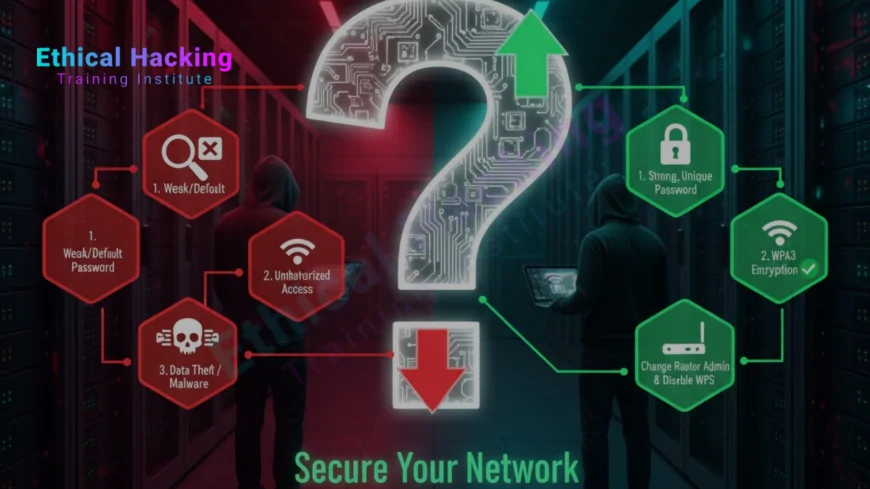
Encryption ensures your data remains unreadable to outsiders. Always select the latest standard—WPA3—whenever possible. Older protocols like WEP and WPA are outdated and can be cracked using modern hacking tools. WPA3 offers stronger protection against offline dictionary attacks and secures public Wi-Fi better than its predecessors.
If your router doesn’t support WPA3, opt for WPA2 with a long and complex passphrase. Combine letters, numbers, and symbols to make it unpredictable. Following resources like guides on advanced encryption can also deepen your understanding of secure communication protocols.
Changing Default Router Credentials
Many users never change the default “admin” credentials on their routers, giving hackers an open invitation. Always set a unique username and strong password for your router’s control panel. Avoid predictable combinations or reused credentials. Once changed, disable remote administrative access unless you absolutely need it.
Updating Router Firmware
Routers often have firmware bugs that manufacturers patch through updates. Outdated firmware is one of the most common vulnerabilities hackers exploit. Log into your router dashboard monthly and check for available updates. Some models allow automatic updates—enable this feature to maintain consistent protection.
Renaming and Hiding Your SSID
Your SSID (Service Set Identifier) is your network’s visible name. Using something like “Home_WiFi” or “Office123” might make sense, but it gives away clues. Rename it to something neutral and avoid personal identifiers. While hiding your SSID adds only minor protection, it reduces visibility to opportunistic attackers scanning for networks.
Activating Network Firewalls
Most modern routers include built-in firewalls that act as a barrier between your network and the internet. Ensure it’s enabled under “Security Settings.” For businesses, pairing a router firewall with a software firewall on every connected device enhances protection. The Cybersecurity Training Institute emphasizes that layered defense—often called “defense in depth”—is crucial for preventing successful attacks.
Implementing MAC Address Filtering
Every device that connects to a Wi-Fi network has a unique MAC address. By setting your router to accept only approved MAC addresses, you can restrict access to known devices. While hackers can spoof MAC addresses, it still adds a significant hurdle, especially when combined with other security measures.
Reducing Signal Range
If your router’s signal reaches beyond your premises, nearby attackers might exploit it. You can lower the transmission power from the router’s advanced settings. Adjusting antenna direction or repositioning the router centrally in your home can also minimize unwanted signal leaks. Even a simple adjustment like this can make your network less discoverable.
Creating a Guest Network
A guest network isolates visitor traffic from your personal devices. If friends, clients, or employees need internet access, configure a separate guest SSID with limited permissions. This prevents any accidental or malicious cross-access to sensitive systems. Professional programs like those at Webasha Technologies often include modules on segmentation and access control for beginners.
Disabling WPS (Wi-Fi Protected Setup)
WPS was designed for convenience but has become a security nightmare. Attackers can brute-force the WPS PIN within hours to join your network. Disable this feature completely. Instead, manually add devices by entering passwords or using QR codes when available. This small change drastically reduces your risk.
Using a VPN for Extra Protection
A VPN encrypts traffic between your device and the internet, even if a hacker manages to intercept Wi-Fi data. For consistent security, install VPN software on your router itself. This ensures that every connected device—laptops, phones, or smart TVs—benefits from encrypted connections. Learn how VPNs integrate with router security by reading resources from cybersecurity educators.
Monitoring Connected Devices
Regularly check your router’s “Connected Devices” list. If you notice an unfamiliar device, change your password immediately. Some routers even support real-time alerts for new connections. Advanced users can use network monitoring tools to detect suspicious bandwidth spikes or unauthorized logins.
Using Network Segmentation
Dividing your network into segments is one of the best defenses. Keep personal, IoT, and guest devices separate. If one segment is compromised, others remain secure. You can apply VLANs (Virtual Local Area Networks) to enforce this separation. This technique, often covered in advanced ethical hacking courses at the Ethical Hacking Institute, provides enterprise-grade security even for home networks.
Turning Off Wi-Fi When Not Needed
Shutting down your Wi-Fi during long absences or overnight removes potential attack windows. Many routers offer scheduling options that automate power cycles, ensuring you’re protected without manual intervention.
Securing Router Access Physically
Cybersecurity isn’t just about digital threats—physical access matters too. Keep your router in a locked area, away from guests or public visibility. Disable unused LAN ports and USB connections. If someone can press the reset button, all your software security measures could be undone instantly.
Wi-Fi Security Checklist
| Security Feature | Purpose | Recommended Action |
|---|---|---|
| WPA3 Encryption | Provides modern encryption standard | Enable |
| Change Default Passwords | Prevents unauthorized admin access | Use complex credentials |
| Disable WPS | Closes brute-force vulnerabilities | Disable |
| Enable Firewall | Blocks unauthorized inbound traffic | Activate on all routers |
Educating Users
Security often fails because users make mistakes, not because of missing tools. Teach your family or employees to identify fake networks, avoid sharing passwords, and use trusted devices. Cyber hygiene training is now part of most corporate onboarding processes because awareness reduces risks dramatically.
Advanced Protection Techniques
- Enable Intrusion Detection Systems (IDS) to monitor anomalies.
- Use DNS filtering to block connections to malicious domains.
- Assign static IPs to prevent unauthorized address changes.
- Enable router logging and periodically review access logs.
Courses from platforms like tutorials on network monitoring can help users understand these features in real-world scenarios.
Building Skills in Network Security
Understanding Wi-Fi protection is easier with hands-on training. Institutions like the Ethical Hacking Institute, Cybersecurity Training Institute, and Webasha Technologies provide beginner-to-advanced modules on wireless penetration testing, router defense, and real-time threat analysis. These skills are essential for anyone pursuing a career in cybersecurity.
Conclusion
Securing your Wi-Fi network is not a one-time setup; it’s an ongoing process. Combining encryption, access control, firmware updates, and user education forms a strong foundation. Remember to check for vulnerabilities periodically and stay informed through reliable resources. As cyberthreats evolve, so should your defense strategy.
Frequently Asked Questions
How often should I change my Wi-Fi password?
Ideally every three to six months, or immediately if you suspect unauthorized devices on your network.
Can WPA2 still protect my network?
WPA2 is reasonably secure, but WPA3 is recommended for optimal protection against modern attacks.
Does hiding my SSID stop hackers?
Not completely. It may deter casual snoopers, but determined attackers can still detect hidden networks.
Should I use public Wi-Fi?
Public Wi-Fi can be risky. Always use a VPN to encrypt your connection before transmitting sensitive data.
Can someone hack my Wi-Fi from another building?
Yes, if your signal reaches them. Reducing your transmission power minimizes that risk.
What’s the safest Wi-Fi password format?
Use at least 16 characters combining uppercase, lowercase, numbers, and special symbols.
Is router placement important?
Absolutely. Place routers centrally and away from windows to limit external signal exposure.
Why disable WPS?
Because WPS PINs are easy to brute force, exposing your network even with strong passwords.
Can I tell if someone is using my Wi-Fi?
Yes. Check the list of connected devices on your router dashboard. Remove unknown ones immediately.
Do firewalls affect Wi-Fi speed?
Only slightly. The minor speed reduction is worth the significant boost in security.
Should I share my Wi-Fi with neighbors?
Never. Sharing credentials increases your attack surface and potential data exposure.
Can a VPN slow down Wi-Fi?
Yes, slightly due to encryption overhead, but the security benefits far outweigh this small loss.
Is MAC filtering effective?
It’s an additional barrier, though not foolproof. Use it with other security layers.
How do I start learning Wi-Fi security?
Join foundational ethical hacking courses at the Ethical Hacking Institute or similar organizations.
Can AI improve Wi-Fi security?
Yes. AI-based intrusion detection and predictive threat models are increasingly being used to secure wireless networks.
What's Your Reaction?
 Like
0
Like
0
 Dislike
0
Dislike
0
 Love
0
Love
0
 Funny
0
Funny
0
 Angry
0
Angry
0
 Sad
0
Sad
0
 Wow
0
Wow
0