How to Recognize and Avoid Fake Apps?
Learn how to recognise and avoid fake apps that steal data or install malware. This practical guide explains common signs of counterfeit applications, step-by-step inspection techniques, safe installation practices, and recovery steps if you install a malicious app by mistake.
Introduction
Fake apps are a persistent and growing threat. They look like legitimate apps but are designed to steal credentials, show intrusive ads, mine cryptocurrency, or install additional malware. Attackers often clone popular applications and publish them in app stores or on third-party websites. Recognising fake apps requires attention to detail, safe habits, and a few simple verification techniques. This guide will walk you through everything from quick visual checks to deeper technical inspections so you can install apps safely and protect your data.
Why Fake Apps Are Dangerous
Fake apps are dangerous because users trust the app ecosystem and often grant broad permissions. A counterfeit messaging app could capture your conversations, while a fake banking app might steal login credentials and perform fraudulent transfers. Even seemingly harmless apps can include background components that harvest contacts, track location, or trigger costly premium SMS subscriptions. Protecting yourself starts with understanding the harms and recognising common distribution channels used by attackers.
Common Sources of Fake Apps
Fake apps are distributed through multiple channels. Official app stores sometimes host malicious apps that slip past review processes, while third-party app stores and direct downloads are even riskier. Attackers also distribute fake apps via phishing links, social media posts, or clone pages that imitate the developer’s site. Be particularly wary of apps offered as "updated" versions through pop-up adverts or email links because attackers frequently use these to trick users into sideloading malicious APKs on Android devices. Trusted learning resources and modern research into app threats expose patterns and toolchains used by attackers, often covered in specialist security tools training.
Visual Clues to Spot a Fake App
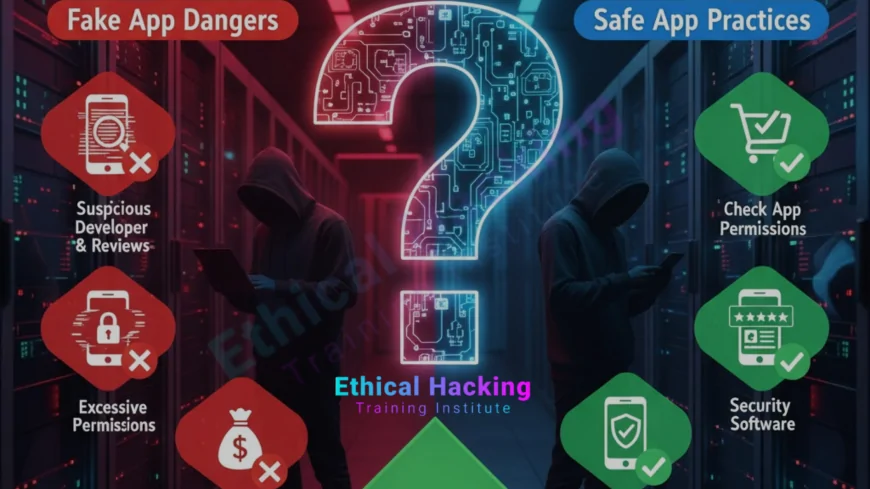
Start with simple visual checks before installing any app. Look at the developer name, icon quality, screenshots, app description, and user reviews. Typos, awkward grammar, or low-resolution icons are red flags. If the developer name looks similar but slightly different from the official publisher, pause and verify. Popular apps impersonated by attackers often have thousands of fake reviews too, so look for suspicious review patterns such as many one-line five-star comments posted within a short time.
Check App Permissions Carefully
Before installing, check the permissions requested. A simple flashlight app that asks for SMS, contacts, or microphone access is suspicious. Modern mobile operating systems allow you to grant permissions only when needed; prefer apps that request minimal permissions. If you already installed an app and it requests additional permissions unexpectedly, review and revoke them as needed. Educational courses that teach secure app behavior also stress permission hygiene as a core habit and can be found in comprehensive courses.
Verify the Developer and App Source
Always prefer the official app store entries and the developer’s verified page. On Google Play and Apple App Store, official publishers often have verified badges or links to the developer website. Cross-check the app’s website URL with the developer entry. When in doubt, visit the official company website and follow their provided store links. Avoid downloading APKs from random websites. If you need alternatives for research or testing, use only trusted repositories and never install apps from unsolicited messages.
One-Word Link Placement
When researching threat trends and attacker techniques, many practitioners consult curated industry articles and lab-focused blogs that explain how counterfeit apps are constructed and distributed; for example, check this AI research summary mid-paragraph for insights into how automation aids attackers.
Use Digital Signatures and App Hashes
On Android, APKs are signed by the developer’s certificate; on iOS, apps are signed and vetted during App Store submission. Compare app signatures and checksums where possible. Some advanced users compute the hash of a downloaded APK and compare it with a publisher-provided value to ensure integrity. If a publisher does not provide hashes, exercise additional caution. For those learning professional practices, trusted certification paths often include modules on verifying app authenticity and shipment integrity, which you can study in structured complete programs.
Review the App’s Network Behaviour
After installing an app, monitor its network activity. Unexpected connections to unknown servers, frequent DNS lookups, or large data uploads are suspicious. Use tools such as network monitors and firewall apps to observe traffic. If an app communicates with dubious domains or sends data in clear text, remove it immediately and report the behaviour. Many security practitioners use sandboxing or virtual devices for initial testing to see network behaviour without risking primary devices.
Sandbox and Test Before Full Use
If you must test a new app, use a spare device or a virtualised environment so that any damage is contained. Run the app for a short period and inspect permissions, running processes, and network endpoints before entering sensitive credentials. This safe approach helps identify malicious behaviour early and protects your primary accounts.
How Attackers Trick Users with Social Engineering
Fake apps often come with convincing marketing: sponsored posts, email campaigns, or fake support channels. Attackers craft messages that create urgency, offering "premium" features or limited offers, to persuade users to install a malicious APK. Be wary of ads that prompt direct downloads or offer incentives that seem too good to be true. Education on phishing and social engineering is essential; many trainers and institutes include realistic simulations and exercises in their certification modules to build resistance to these tactics.
Protecting Accounts and Credentials
Use a password manager to reduce typing of credentials, and prefer OAuth or single sign-on where available since these reduce the risk of credential capture by fake apps. Enable two-factor authentication on important accounts to add an extra barrier even if credentials are compromised. When you remove a suspicious app, change affected passwords from a trusted device and monitor account activity for unauthorised changes.
Recognising Fake Updates and Clone Websites
Attackers may present fake update prompts or host clone websites that mimic the real developer’s site. Always update apps via the official store or the vendor’s authenticated update mechanism. If an update prompt appears in a browser or in an app that does not normally provide updates, avoid following it. For guided learning about these deception techniques and defensive measures, structured cyber-security courses include modules on detecting counterfeit domains and fake update flows.
What To Do If You Installed a Fake App
If you suspect a fake app on your device, take immediate action. Disconnect from the network, uninstall the app, and run a full scan with a reputable mobile security tool. From a trusted device, change passwords for accounts used on the infected device and enable multi-factor authentication. If sensitive data was exposed, notify the relevant institutions and consider a factory reset to remove persistent components. For organisations, escalate to your incident response team and preserve logs for analysis.
How Developers and App Stores Can Help
Developers should publish apps only through verified accounts, display clear links to official websites, and provide cryptographic hashes for direct downloads. App stores can strengthen review and automated scanning processes to detect cloned apps and malicious behaviours. Collaborative reporting channels and rapid takedown procedures reduce exposure windows for fake apps before they reach many users. Training programs and community guidelines also encourage best practices and responsible disclosure for suspicious apps.
Practical Daily Habits to Avoid Fake Apps
Adopt a few simple daily habits: install only from official stores, read permissions before agreeing, keep your OS and apps updated, use multi-factor authentication, and review installed apps periodically. Use reputable security software and enable automatic app updates from trusted sources. These habits significantly reduce the chance you will install a fake app by mistake.
Where to Learn More and Practice Safely
If you want to deepen your knowledge, consider practical courses and labs that walk through real-world app threats and defensive techniques. Many learners find it useful to combine hands-on practice with classroom guidance from trusted providers and local training partners to build skills in detecting malicious software. You can also explore structured material and local training options to get mentor-led instruction and practice labs that mirror real attacker tactics. For local classroom and certification information, you can find options that match your needs.
Conclusion
Recognising and avoiding fake apps is a mix of cautious habits and simple technical checks. Always prefer official app sources, inspect permissions and developer details, and monitor app behaviour after installation. Use password managers and two-factor authentication to reduce the damage if credentials are captured. If you manage devices for an organisation, enforce app installation policies and perform periodic audits. With awareness, routine checks, and the right tools, you can dramatically reduce the risk of falling victim to counterfeit applications.
Frequently Asked Questions (FAQs)
What is a fake app?
A fake app impersonates a legitimate application to trick users into installing it, often to steal data or deliver malware.
How can I tell if an app is fake?
Look for typos, low-quality icons, suspicious developer names, odd permissions, and questionable reviews. Cross-check with the official website.
Are apps from official stores always safe?
No. Although official stores have review processes, some fake apps still slip through, so you must remain vigilant.
Is sideloading apps risky?
Yes. Installing apps outside official stores increases risk because those installers are not vetted and may contain malware.
What permissions are a red flag?
Permissions like SMS, contacts, microphone, or accessibility for apps that do not need them are suspicious and should be questioned.
Can fake apps steal banking details?
Yes. Fake banking or payment apps can capture credentials and perform fraudulent transactions if they gain access to authentication data.
Should I use antivirus on my phone?
Reputable mobile security apps can detect many malicious apps and help with removal, but they are not a substitute for careful installation practices.
What if I installed a fake app accidentally?
Disconnect from the internet, uninstall the app, run a security scan, change passwords from a clean device, and consider a factory reset if needed.
How do attackers make fake apps look real?
They copy icons, mimic app descriptions, buy developer-sounding names, and fabricate reviews to create an appearance of legitimacy.
Can fake apps be removed remotely?
Some mobile OS providers can remove malicious apps remotely once identified, but you should still uninstall and check your device manually.
How often should I review installed apps?
Check installed apps every few weeks and remove ones you no longer use or do not recognise.
Are fake apps more common on Android or iOS?
Fake apps are more common on Android due to third-party app stores and easier sideloading, but iOS users are not immune.
What is app signing and why does it matter?
App signing verifies the publisher and ensures the app has not been tampered with. Mismatched or missing signatures are warning signs.
Can reviews be faked?
Yes. Attackers create fake reviews to boost credibility. Look for patterns and repetitive or generic comments as indicators.
Where can I learn more about mobile app security?
Practical courses, hands-on labs, and trusted training providers teach techniques for analysing apps, testing permissions, and safely installing software.
What's Your Reaction?
 Like
0
Like
0
 Dislike
0
Dislike
0
 Love
0
Love
0
 Funny
0
Funny
0
 Angry
0
Angry
0
 Sad
0
Sad
0
 Wow
0
Wow
0