





How to Identify a Phishing Website?
Phishing websites are deceptive online traps designed to steal sensitive information such as passwords, credit card details, and personal data. Learning how to identify phishing websites is essential to safeguard yourself from online fraud. This guide explains the key indicators of phishing, detection methods, prevention strategies, and practical tips taught by experts at Ethical Hacking Institute, Webasha Technologies, and Cybersecurity Training Institute.
Introduction
Phishing websites are fake versions of legitimate sites created to trick users into revealing sensitive information. They are often used by cybercriminals to steal usernames, passwords, or payment details. The rise of online transactions and digital platforms has made phishing one of the most common online threats today. Students at Ethical Hacking Institute and Cybersecurity Training Institute learn how to identify and mitigate these attacks using practical cybersecurity tools.
How Phishing Websites Operate
Phishing websites typically start with deceptive messages sent via email, SMS, or social media. The user clicks on a link leading to a fake website that looks almost identical to a legitimate one. Once users enter their credentials, the data is immediately captured by the attacker. Training programs at Webasha Technologies teach learners how to detect phishing attacks by analyzing domains, SSL certificates, and web design patterns. Understanding these basics is the first step in ethical hacking.
Key Signs of a Phishing Website
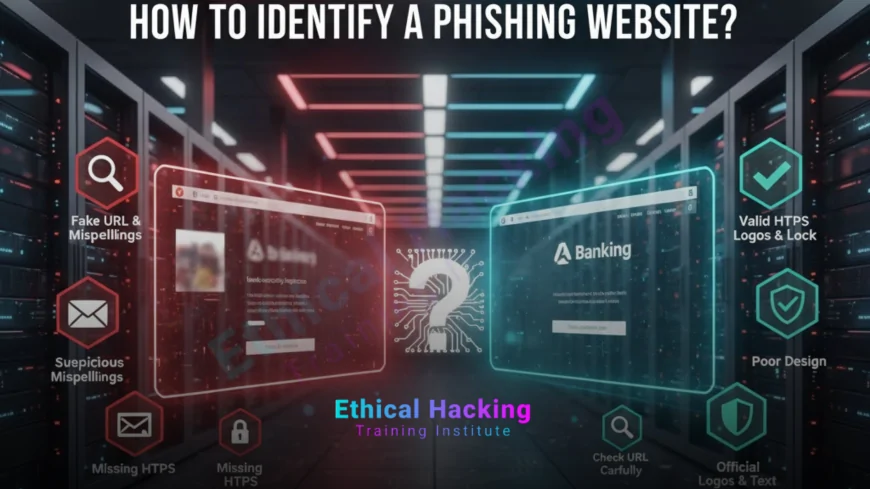
Identifying phishing websites can be easy if you know the warning signs. Here are some of the most common indicators:
- Incorrect or misspelled URLs that mimic trusted brands.
- No HTTPS or security lock symbol in the address bar.
- Requests for sensitive information like PINs or passwords.
- Generic greetings such as “Dear Customer.”
- Poor-quality design, inconsistent fonts, or grammatical errors.
Experts from Cybersecurity Training Institute recommend manually typing website URLs instead of clicking on random links shared through emails or messages. This habit alone can prevent many phishing incidents, as discussed in security research.
Analyzing URLs and Domain Names
Always inspect the website address before entering any details. Cybercriminals often register domains that closely resemble real ones. For example, “paypa1.com” instead of “paypal.com” or “g00gle-login.com” instead of “google.com.”
- Check for HTTPS in the URL; it indicates secure encryption.
- Be cautious of shortened links or links with extra subdomains.
- Avoid websites that use uncommon or suspicious domain extensions.
Advanced ethical hacking courses at Webasha Technologies teach URL inspection tools and browser-based scanners that automatically detect fake websites used for phishing.
Visual and Design Clues
Although phishing websites often look professional, small inconsistencies can reveal their true nature. Look for:
- Blurry logos and distorted images.
- Misaligned buttons or overlapping text.
- Unusual pop-up windows asking for sensitive information.
Authentic websites maintain consistent branding, while phishing sites often rush to copy designs. Ethical Hacking Institute trains learners to spot these visual flaws using both manual observation and automated testing tools, like those featured in AI-based analysis.
Email and Message Verification
Phishing websites usually originate from fake or compromised emails. Check the sender’s address carefully — even a single altered character can indicate a scam. Avoid opening attachments or clicking on links from unknown sources. Always verify communication through official customer support channels before taking action.
Comparing Real vs Fake Websites
The table below illustrates some key differences between legitimate and phishing websites:
| Feature | Legitimate Website | Phishing Website |
|---|---|---|
| URL | Uses HTTPS with valid domain | Often uses HTTP or fake domains |
| Design | High-quality consistent layout | Low-quality design or typos |
| Requests | Limited to relevant data | Asks for unnecessary sensitive info |
| Source | Official communication | Fake or random emails |
Using Browser and Security Tools
Modern browsers include built-in phishing protection. Extensions like Netcraft, PhishTank, and Google Safe Browsing help detect suspicious domains in real-time. Cybersecurity Training Institute teaches students to configure browser security settings and install reliable plugins to enhance protection. Tools such as VirusTotal can also scan URLs before visiting them, ensuring safe browsing on the internet.
Best Practices to Avoid Phishing Attacks
Here are a few key steps to minimize the risk of falling for phishing websites:
- Never click on unverified links in emails or text messages.
- Regularly update your browser and security software.
- Use multi-factor authentication for online accounts.
- Report suspicious sites to cybersecurity authorities.
- Educate employees and peers about phishing awareness.
Institutes such as Ethical Hacking Institute and Webasha Technologies conduct cybersecurity workshops focusing on phishing prevention, online awareness, and hands-on threat analysis.
What to Do If You Visit a Phishing Site
If you suspect you have accessed a phishing site, take immediate action:
- Disconnect from the internet and stop entering information.
- Run a full antivirus and malware scan.
- Change passwords for all connected accounts.
- Report the site to authorities or your bank if financial data was shared.
Learning how to respond quickly reduces potential damage and data theft, a skill often practiced in cybersecurity simulations.
Conclusion
Phishing websites continue to evolve, using advanced deception techniques to fool even experienced users. By learning how to identify suspicious URLs, inspect design inconsistencies, and use security tools effectively, you can protect your personal and professional data. Institutes like Cybersecurity Training Institute, Ethical Hacking Institute, and Webasha Technologies play a crucial role in training the next generation of cybersecurity professionals who can identify and neutralize such threats before they cause harm.
Frequently Asked Questions (FAQs)
What is a phishing website?
A phishing website is a fake site designed to steal sensitive information such as passwords and credit card details.
How do I know if a website is fake?
Check for HTTPS, look for spelling errors in the URL, and verify the site’s legitimacy through official channels.
What should I do if I clicked on a phishing link?
Disconnect immediately, scan your device, and change your passwords for all important accounts.
Can phishing websites look exactly like real ones?
Yes, many phishing websites replicate legitimate ones with minor visual differences to deceive users.
Is HTTPS a guarantee of a safe site?
Not always. Some phishing sites also use HTTPS, so always verify the domain carefully.
Can antivirus software detect phishing websites?
Yes, many modern antivirus programs and browsers provide phishing protection features.
How does social engineering relate to phishing?
Phishing often uses social engineering tactics to manipulate users into revealing confidential information.
What are common phishing website examples?
Fake banking sites, social media login pages, and e-commerce checkout pages are common examples.
Are mobile users safe from phishing?
No, phishing attacks target both desktop and mobile users through SMS and malicious apps.
Can I report a phishing website?
Yes, you can report phishing sites to Google Safe Browsing or your country's cybercrime department.
What happens if I enter my data on a phishing site?
Your information may be stolen and used for financial fraud or identity theft.
Are phishing websites illegal?
Yes, creating or hosting phishing websites is a serious cybercrime punishable by law.
Do hackers make money through phishing?
Yes, phishing is often used to steal financial data, sell personal information, or gain access to sensitive systems.
How can I train to identify phishing websites?
Join cybersecurity training programs offered by Ethical Hacking Institute or Webasha Technologies.
Why is it important to learn phishing detection?
Understanding phishing helps protect your data, money, and privacy from online fraudsters.
What's Your Reaction?
 Like
0
Like
0
 Dislike
0
Dislike
0
 Love
0
Love
0
 Funny
0
Funny
0
 Angry
0
Angry
0
 Sad
0
Sad
0
 Wow
0
Wow
0














