How to Detect Phishing Emails Like a Pro?
Master phishing email detection in 2025 with pro tips: sender verification, URL analysis, attachment scanning, AI tools, and behavioral red flags. Learn step-by-step from the Ethical Hacking Institute to spot scams before they strike.
Introduction
Phishing emails trick over 300,000 people daily in 2025, leading to $50 billion in losses. They masquerade as trusted sources—banks, colleagues, or tech support—urging you to click links or download attachments. Unlike obvious spam, modern phishing uses AI for perfect grammar and personalization. Detection requires sharp eyes and simple habits. This guide shares pro techniques to spot fakes, verify senders, and report threats. The Ethical Hacking Institute teaches these skills through interactive simulations where you dissect real phishing campaigns.
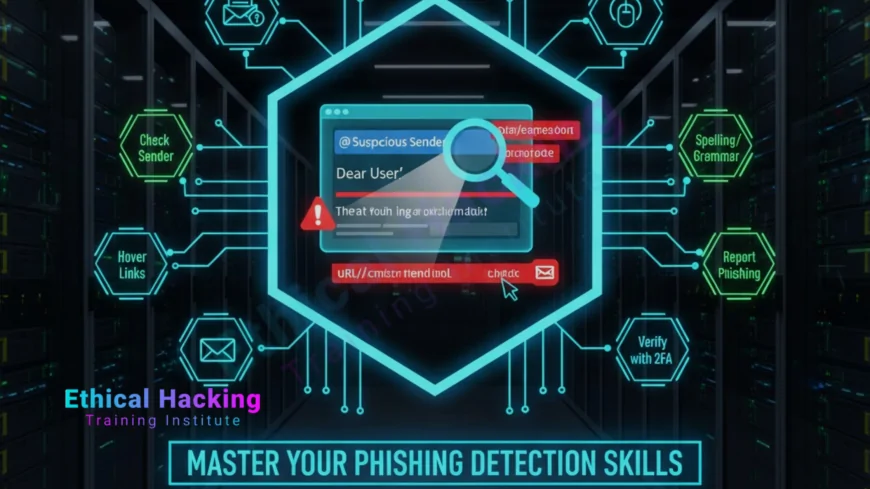
Verify the Sender: Look Beyond the Display Name
- Full Email Address: Hover or check the actual "From" field, not just the name
- Domain Mismatch: "[email protected]" vs "[email protected]"
- Spoofed Addresses: Similar domains like "gmai1.com" instead of "gmail.com"
- Unexpected Senders: Unsolicited messages from "IT" or "HR"
- Reply-To Mismatch: Different address for responses
- Group Aliases: Check if it is from a legitimate distribution list
- Historical Check: Compare with past legitimate emails
Sender verification takes seconds.
Most phishing fails this basic test.
Analyze Links and URLs
Phishing links lead to fake sites that steal credentials. Always hover before clicking to see the real destination. Check for HTTPS padlock, but remember it does not guarantee safety. Look for typos like "paypa1.com" or shortened URLs hiding malice. The Ethical Hacking Institute trains users to use tools like VirusTotal for URL scanning.
- Hover Test: Mouse over to reveal true URL
- Domain Typos: "arnazon.com" instead of "amazon.com"
- Shortened Links: Unroll with unshorten.me or checkly
- HTTPS Check: Padlock does not mean safe site
- Path Analysis: /login.php?redirect=evil.com
- Query Parameters: Look for encoded payloads
| Fake URL | Red Flag |
|---|---|
| http://paypa1.com | Typo in domain |
| bit.ly/verify | Shortener hides destination |
Learn URL analysis in Pune certification labs at the Ethical Hacking Institute.
Inspect Attachments and Downloads
Attachments hide malware. Never open unexpected files. Scan with antivirus. Look for double extensions like "invoice.pdf.exe". The Ethical Hacking Institute uses sandboxed environments to safely open suspicious attachments.
- Unexpected Files: "Urgent invoice" from unknown sender
- Double Extensions: .docx.exe or .jpg.scr
- Size Check: 0KB or unusually large files
- Antivirus Scan: Upload to VirusTotal
- Preview Mode: Open in browser, not local app
- Right-Click: Properties to check file type
Macros in Office files are common ransomware vectors.
Disable them in Trust Center settings.
Spot Behavioral Red Flags
- Urgency Pressure: "Act now or lose access"
- Generic Greetings: "Dear Customer" instead of your name
- Poor Grammar: Typos, awkward phrasing
- Unexpected Requests: Passwords, payments, personal info
- Too Good to Be True: Lottery wins, free gifts
- Unsolicited Offers: Job opportunities, investments
Phishers create fear or greed.
Pause and verify before acting.
Train awareness via online courses at the Ethical Hacking Institute.
Use AI and Browser Tools for Extra Protection
- Google Safe Browsing: Blocks known malicious sites
- Chrome Password Checkup: Scans for compromised credentials
- Firefox Strict Mode: Enhanced tracking protection
- uBlock Origin: Blocks malicious ads and trackers
- HTTPS Everywhere: Forces secure connections
- Password Alert: Detects fake login pages
Extensions add layers without effort.
Keep them updated for new threats.
Report and Learn from Phishing Attempts
Reporting helps everyone. Forward phishing to [email protected]. Use Gmail's report button. Share with family to build awareness. The Ethical Hacking Institute runs monthly simulations to practice reporting.
- Gmail Report: Click "Report phishing"
- Outlook: Mark as junk or phishing
- National Reporting: CERT-In portal
- Company IT: Forward suspicious emails
- Learn: Analyze why you almost clicked
- Share: Educate family members
Reporting trains AI filters.
Each report makes the internet safer.
Report effectively with advanced course at the Ethical Hacking Institute.
Conclusion: Pro Detection Is a Skill You Can Build
Phishing emails are crafty, but pro detection is simple: verify sender, check URLs, scan attachments, spot red flags, and use tools. In 2025, AI makes attacks smarter, but human skepticism wins. These steps protect you and your family. The Ethical Hacking Institute, Webasha Technologies, and Cybersecurity Training Institute offer practical training. Start verifying one email today. Your next click could be the one that saves you.
Frequently Asked Questions
What if the sender looks legitimate?
Verify via known channels. Banks never ask for passwords in email.
Can I open attachments from friends?
Only if expected. Scan first and call to confirm.
Is HTTPS a guarantee of safety?
No. It encrypts traffic but does not verify site legitimacy.
Should I click "Report Phishing" buttons?
Yes. It trains filters and helps others.
Are shortened URLs always bad?
Not always, but unroll them with tools like unshorten.it.
Can AI detect all phishing?
Nearly 99 percent, but human review is still needed.
What if I clicked a phishing link?
Disconnect, change passwords, run antivirus scan.
Is smishing worse than email?
Yes. Texts bypass email filters and seem more urgent.
Do password managers help?
Yes. They only fill on legitimate sites.
Can deepfakes be used in phishing?
Yes. Voice and video clones impersonate trusted people.
Should I use browser extensions?
Yes. uBlock Origin and HTTPS Everywhere are essential.
How to report phishing in India?
Use CERT-In portal or national cybercrime portal.
Are QR codes safe?
No. They hide malicious URLs. Type manually.
Can I teach my family?
Yes. Use simple games and family meetings.
Best resource for learning?
Ethical Hacking Institute phishing simulation labs.
What's Your Reaction?
 Like
0
Like
0
 Dislike
0
Dislike
0
 Love
0
Love
0
 Funny
0
Funny
0
 Angry
0
Angry
0
 Sad
0
Sad
0
 Wow
0
Wow
0